Loading workflows…
 OUTA10IDEAS. BUILD. REPEAT.Sign in
Complete · Started September 16, 2026
Four original illustrations generated for the first public outa10 homepage. The first hero crop made the computer too large and the quiet left area too wide; the revised version restores more skyline and keeps the text opening around 31%. The generated Indistory interface is labeled as an interface study. Native dimensions were retained; Next.js serves optimized images.
Choose the page layout first. Mark the artwork regions and reserve quiet space for live headings and buttons. Keep the approved reference alongside each asset prompt.
Generate the hero, CRT mark, project illustration, and Vibe thumbnail separately. Remove webpage headings, navigation, and buttons from the artwork. Request native transparency for the mark and a wide crop for the hero. Save the complete prompt and actual output dimensions.
HERO
Use case: precise-object-edit. Recreate the supplied image with the LEFT NEGATIVE SPACE made into one nearly rectangular, full-height, pale warm cream panel occupying exactly the LEFT 29 percent of the image width. Use the same cream color already shown. Its right edge is vertical at29% across the entire image, with only tiny stepped pixel irregularities. Keep the thin pole and vine at far left. No other landscape, leaves, bushes, posts, cables or signs can overlap this left29% reserved text area; scene begins to its right. This is one coherent pixel illustration, not a hard white overlay: the vine-covered navy post naturally forms the right boundary of the cream area. Preserve the entire detailed panorama to the right, the current small CRT and cat on the desk, the broad skyline, mountain peaks, full circular sun, warm amber/cobalt palette, crisp pixel-art style, and their current sizes and vertical positions. Keep exact native2172x724 three-to-one canvas, do not zoom or reframe. Keep current extra blue sky at top because webpage crops off upper22.65%, retaining lower77.35%. No main headline, subtitle, buttons or UI text. In-world physical signs may keep their words. Important: left blank cream panel extends fullheight uniformly29% wide, no diagonal widening or narrowing, not19% wide, not35% wide.

---

MARK
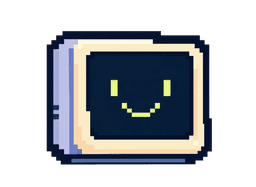
Use case: logo-brand. Precisely recreate this supplied 82x60 reference crop as a high-resolution pixel-art logo asset, native output 1230x900 pixels, preserving its exact 82:60 canvas ratio. The reference is a tiny CRT computer icon, cream-colored plastic front bezel and navy-black square screen with two tiny yellow-lime pixel eyes and a thin U-shaped lime pixel smile. CRITICAL GEOMETRY: Almost perfectly FRONT-FACING orthographic computer. Only a very thin blue-grey LEFT side strip around 6% of the icon width is visible. The front face is a nearly square rectangle with small stepped pixel corners; the top and bottom edges are horizontal. Do not turn the monitor three-quarter view. No large visible side panel or vents, no bulky pedestal: just a narrow blue-grey foot strip directly under the body, almost no protrusion. Thick irregular deep navy pixel outlines, tiny cobalt shaded lower and left edges; cream bezel and opaque cream paint. The whole icon occupies 68% of the canvas width and 82% of its height. It is positioned as in the reference: left edge x=16%, right edge x=84%, top y=14%, bottom y=96%, leaving more margin above than below. Transparent PNG background with genuine alpha; preserve cream plastic and dark screen as fully opaque. Match the reference drawing, exact frontal silhouette, perspective, small face, delicate pixel detail and low contrast cream/blue-grey bezel. No restyling. No words, letters, keyboard, cables, props, extra objects or border. Do not substitute a new CRT design. The reference crop is the sole visual authority.

---

PROJECTPREVIEW
Use case: ui-mockup. Recreate supplied approved cropped image as a polished ILLUSTRATIVE DARK INTERFACE STUDY for a project thumbnail. Native output requested 1728x728 pixels, aspect 2.374:1, at minimum 1080x455 pixels. Match the original perspective, pixel-art environment, navy/cobalt/cream/warm amber palette, stepped outlines and crisp detailed shading. Full-frame illustration: a cozy plant-filled urban studio at sunset, a narrow strip of window and violet-orange mountain skyline at the top, vines framing left, bookshelf and small golden lamp on right. Main lower central object is an illustrated dark navy software window taking around 81 percent width, with a thin electric-blue edge, not a browser screenshot. Study window header contains a tiny bright sprout flower symbol, title 'Indistory', small tagline 'Discover tools. Keep what’s useful.', and a quiet search field. Left sidebar small rows Home, Models, Tools, Repositories, MCP & skills, Saved. Main panel title 'Curated for builders', four neat equally spaced dark cards with colorful simple symbols for Python, Claude, LangChain, Cursor and short muted caption lines. This is intentionally a raster depiction of an interface study that the surrounding website will label as a concept illustration, so retain this in-world depicted interface. No external webpage headings, captions, nav, buttons or decorative page chrome beyond the illustrated window itself. Physical wall sign at upper right reads GOOD TOOLS BRIGHTER DAYS. Composition fills all edges, no outer border, no margins, no rounded page corners, no drop shadow around the whole plate. Do not change the approved scene composition.

---

VIBEPREVIEW
Use case: stylized-concept. Recreate supplied approved cabin thumbnail as a clean full-frame pixel-art landscape illustration. Requested native resolution 1536x744 pixels, aspect 2.0645:1. Keep original composition, scene and proportions precisely: cozy little timber cabin in right half beside a clear cobalt-blue mountain lake, warm amber glowing windows and doorway, small front porch and stone path, dark navy pine forest and leafy foreground frame at both sides, craggy cool blue mountain peaks in the distance, narrow violet-pink sunset sky at the top, a few stepped pastel clouds and one tiny flying bird silhouette. A small warm golden reflection beneath the cabin contrasts with cool ultramarine water and green pine forest. Very crisp expressive pixel clusters and stepped silhouettes, no smooth vector or painterly gradients. Match the reference's nostalgic detailed game illustration and high-contrast navy outlines. No text, captions, interface, controls, outer borders, rounded corners, letterboxing or empty margins. Artwork fills the full canvas edge to edge.
Choose the page layout first. Mark the artwork regions and reserve quiet space for live headings and buttons. Keep the approved reference alongside each asset prompt.
Generate the hero, CRT mark, project illustration, and Vibe thumbnail separately. Remove webpage headings, navigation, and buttons from the artwork. Request native transparency for the mark and a wide crop for the hero. Save the complete prompt and actual output dimensions.
Record requested size and aspect ratio, actual output dimensions, transparency, and any crop used on the page. Record the model version if the tool exposes it; do not guess.
The approved page image and a separate reference crop for each illustration. Keep reference images with the result.
Place the assets behind real HTML text and controls. Check the hero crop, contrast, and image loading at desktop and phone sizes. Review the CRT mark on light and dark backgrounds. Compare the result with the approved direction, revise material differences, and retain the exact prompts alongside the final files.
hero: 2172 × 724 pixels; opaque.
mark: 1466 × 1073 pixels; transparent.
projectpreview: 1932 × 814 pixels; opaque.
vibepreview: 1802 × 873 pixels; opaque.
Hero is displayed with a bottom-aligned cover crop. Exact model version was not exposed by the image tool.
Approved outa10 layout with a panoramic rooftop city scene, a dark Indistory interface study, a Vibe cabin thumbnail, and a smiling CRT identity. Individual asset crops supplied as references.
Place the assets behind real HTML text and controls. Check the hero crop, contrast, and image loading at desktop and phone sizes. Review the CRT mark on light and dark backgrounds. Compare the result with the approved direction, revise material differences, and retain the exact prompts alongside the final files.